

Last Updated: June 5, 2026
MS Project Master Class Mastery Journey
The MS Project Master Class offers a structured learning journey instead of a typical software tutorial. Rather than just reading about Microsoft Project features, students follow a guided process that includes reading, hands-on practice, online exercises, assessments, and the creation of a complete Master Project. We call this the Mastery Journey.
The journey starts when you buy the Master Class Book and register online. Registration gives you access to the Master Class Learning Portal, where you’ll find downloadable files, Activity Workspaces, and online exams. The Master Class Book and MS Project Learning Portal work together as a complete Microsoft Project learning system.
New to the MS Project Master Class?
If you found this page through a search engine or external link, use the “Start Here” button below to learn how the Master Class, Workspaces, exercises, and Master Project are organized.
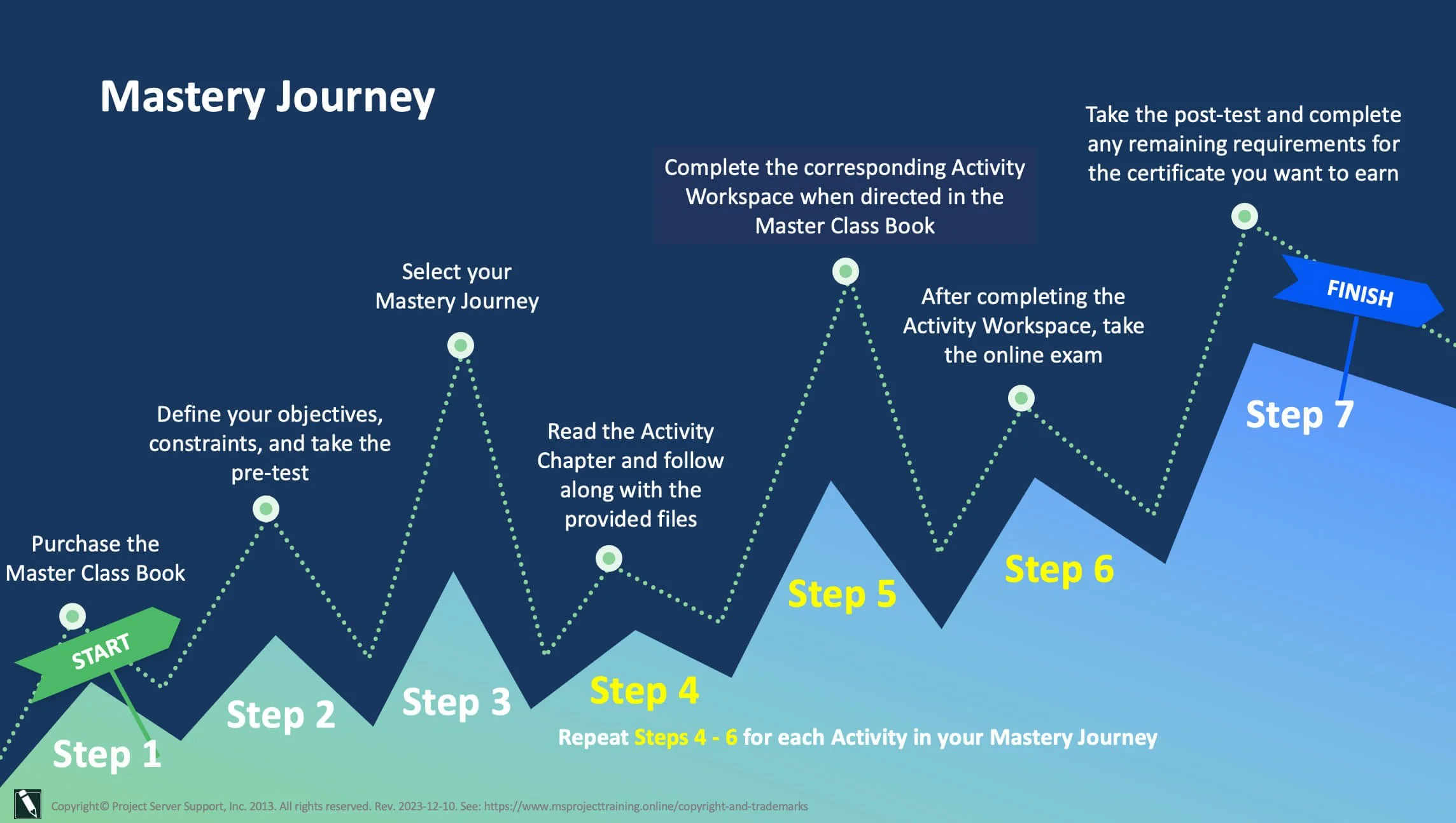
The MS Project Master Class Mastery Journey provides a step-by-step roadmap for completing the course. It illustrates how students progress through the Master Class Book, Activity Workspaces, downloadable Microsoft Project files, online exams, and the Master Project while preparing for certification and professional project management practice.
Project MAP < Mastery Journey > Master Project Explanation
After you register, it’s helpful to reflect on your goals, limitations, and expectations for the course. Everyone comes to the Master Class with different backgrounds, schedules, and needs. Some people want a quick overview of Microsoft Project, while others prefer to spend more time building advanced planning and scheduling skills.
Consider these questions as you get started:
How soon do you want to finish the Master Class?
Which topics or skills are most important for you to learn?
Would you rather work on your own or with a coach?
Are you planning to earn a certificate?
Are there any time, budget, or work limits that could affect your progress?
Do you have any professional goals tied to finishing the Master Class?
Your answers to these questions will help you choose the right Mastery Journey and decide how to move through the course.
Once you start, you’ll follow the Project MAP framework, which guides you step by step. Each Activity in the Master Class Book covers a stage in building a solid project plan. You’ll read the chapter, review the workflow, and use downloadable Microsoft Project files and other materials to follow along.
At certain points, you’ll switch from the Master Class Book to the matching Activity Workspace in the Learning Portal. There, you’ll do exercises, review and apply Microsoft Project features, check your work, and keep building your Master Project. This back-and-forth between reading and doing helps you learn by practicing with the software.
After you finish the Workspace exercises for an Activity, you’ll take an online exam to check your understanding of the concepts, techniques, and Microsoft Project features you just learned. You’ll repeat this process for each Activity in your chosen Mastery Journey.
The journey ends with a post-test, final evaluations, and, if you want, the final steps to earn your certificate. By the end of the Master Class, you’ll understand Microsoft Project features and how they help with planning, scheduling, execution, and project control throughout a project’s life cycle.
Master Class Mastery Journey FAQs
What Is the MS Project Master Class Mastery Journey?
The Mastery Journey is a step-by-step path that guides students through the MS Project Master Class. It brings together the Master Class Book, Learning Portal, Activity Workspaces, workflows, downloadable files, exercises, assessments, and exams. These resources help students gradually build a complete and well-organized Microsoft Project plan.
Can I Take the MS Project Master Class Independently?
Yes. The MS Project Master Class is built for independent learning, so students and professionals anywhere can use it. You can move through the activities, exercises, workflows, and Master Project at your own pace with the help of the Master Class Book and Learning Portal.
Do I Need the Master Class Book?
Yes. The Master Class Book is the main guide for the Mastery Journey. The Activity Workspaces and Learning Portal build on the ideas, workflows, exercises, and standards you learn in the book.
What Is the Master Project?
The Master Project is a full Microsoft Project schedule that you build as you go through the MS Project Master Class. As you complete each activity, you add more details like structure, estimates, schedule logic, resources, calendars, costs, baselines, reporting elements, and controls.
What Will I Learn During the Mastery Journey?
Students learn how to:
Create a Work Breakdown Structure (WBS).
Develop estimates.
Establish schedule logic.
Assign and manage resources.
Baseline and update projects.
Evaluate project performance.
Use Microsoft Project as a professional planning, forecasting, and project control system.
Build clear, logical, and technically sound project plans.
How Long Does the MS Project Master Class Take?
How long it takes to finish the MS Project Master Class depends on which version you choose, your experience, and how quickly you want to study. You can find detailed time estimates for reading, exercises, Activity Workspaces, and each class version in the MS Project Master Class Schedule.
Can I Work on My Own Real Project?
Yes. Whenever possible, students are encouraged to base their Master Project on a real project from their own industry, organization, or area of expertise. This approach helps you build both your Microsoft Project skills and your real-world project planning experience.
Is Coaching Available?
Yes. If you want extra help, optional coaching services are available. These can include guidance, schedule reviews, accountability, technical feedback, or support as you work through the Master Class and your Master Project. Coaching may cost extra, in addition to the price of the Master Class Book.
Are Exams, Certificates, or Assessments Included?
The MS Project Master Class includes assessments and exams linked to the Activities and Learning Portal. Some coaching programs, evaluations, or certificate services may have extra costs beyond the standard Master Class materials.
Can Trainers, Consultants, or Organizations Use the Mastery Journey?
Yes. The Mastery Journey is made for independent learners as well as trainers, consultants, PMOs, organizations, and schools. Its structured activities, workflows, downloadable files, assessments, and Project MAP framework support workshops, coaching, corporate training, and classroom teaching.
Is the MS Project Master Class Designed for Beginners or Experienced Users?
The MS Project Master Class works for all experience levels. Beginners can follow the step-by-step workflows and exercises, while experienced project managers, schedulers, consultants, and trainers can use the material to improve their scheduling, project controls, and understanding of Microsoft Project as a professional planning and forecasting tool.