

Last Updated: June 5, 2026
Master Project Explanation
The Professional Project Manager — The Foundation of This Master Class
If you spend enough time working on projects, you start to see a pattern. Most projects do not fail because of one big mistake. Instead, they fail because something important was missing. Maybe the plan looked good but was not realistic, the team worked hard but was not on the same page, or the plan made sense on paper but did not work in practice. Often, the real problem is that the project manager is strong in one area but not in others.
A more complete view of a professional project manager goes beyond what most educational programs teach. It is not enough to know project management concepts, get along with people, or have strong leadership skills. A true professional brings together three things:
Project management and leadership skills.
Industry or domain expertise.
The ability to use planning tools correctly and efficiently.
New to the MS Project Master Class?
If you found this page through a search engine or external link, use the Start Here button below to learn about the Free and Complete MS Project Master Classes, the Learning Portal, Project MAP framework, Activity Workspaces, exercises, and the Master Project.
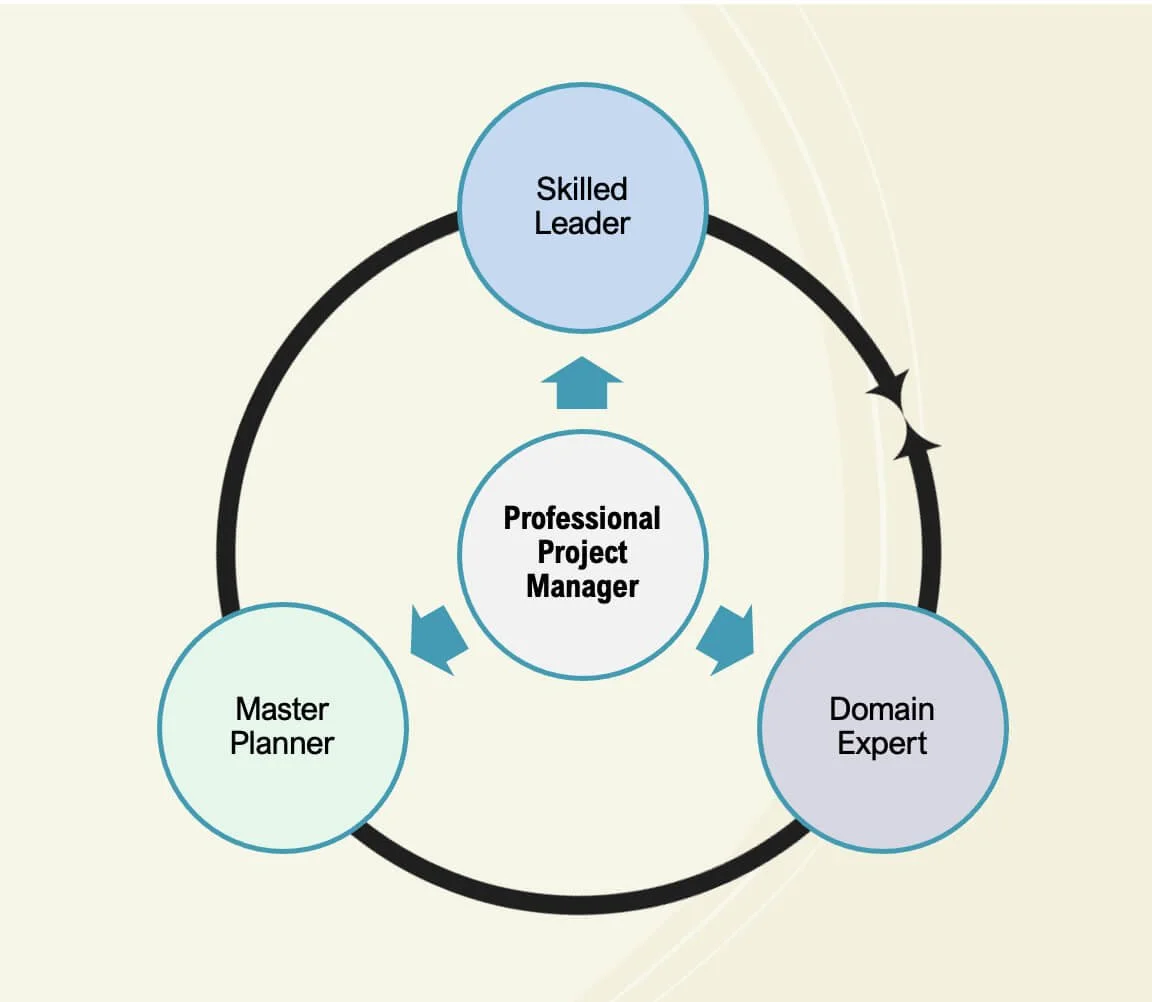
The Professional Project Manager model illustrates the three core competencies developed throughout the MS Project Master Class: leadership, industry or domain expertise, and the ability to build technically correct Microsoft Project schedules. Together, these capabilities form the foundation of professional project planning and management.
Mastery Journey < Master Project Explanation > About the Author
Professional Project Manager.
Project Management Knowledge. Industry or Domain Expertise. Planning Mastery. All three are needed for effective project management. All three are characteristic of the professional project manager.
Project management knowledge is the foundation. It means understanding how projects are set up and managed, including scope, schedule, cost, risk, stakeholders, and the processes that link them. Frameworks like the PMBOK® Guide provide structure, but they do not manage projects for you. Sooner or later, the project manager must apply that knowledge in real situations, make tough choices, and adapt when circumstances change.
Industry or domain expertise keeps the project realistic. The project manager does not have to be the top engineer, developer, or builder, but they need to know enough to ask good questions and spot when things are off. Without this understanding, estimates are unreliable, risks get missed, dependencies are ignored, and the team can lose trust in the schedule.
The third area, which is often overlooked, is knowing how to build and manage a Master Project plan with the right planning software. Tools like Microsoft Project do more than just record a plan. They calculate dependencies, set up calendars, check resource availability, test the schedule's logic, predict finish dates, and identify problems that might not be obvious. If you do not understand how the tool works, you are not really managing the schedule; you are just reacting to it.
What sets a professional project manager apart is not being great at just one thing, but at combining all three areas. Project management knowledge shows what should happen. Industry knowledge shows what makes sense. Microsoft Project, when used correctly, helps the project manager build, test, calculate, forecast, and manage the plan to match real-world work. When all three areas work together, schedules are more realistic, decisions are better, and projects are easier to manage. If one area is missing, problems surface quickly as late surprises, poor forecasts, extra work, or a loss of trust from the team.
This is the standard to aim for. Do not settle for just following a process, relying on personality alone, or depending solely on technical skills. Instead, become a project manager who understands how projects work, knows the work being done, and can use Microsoft Project to build and manage a realistic and solid project plan.
As you work through the Activities in this Master Class, you will build skills in all three areas at the same time. You will learn project management tools and techniques, ideally create a project plan in your field, and use Microsoft Project correctly to organize, calculate, analyze, and manage your plan. Over time, these skills come together. At some point, often without realizing it, you will fully begin to develop into a professional project manager.
The result of these three areas working together is the ability to build and manage a professionally structured Master Project.
The Master Project — Building a Professional Microsoft Project Plan
A key idea in this Master Class is building a Master Project. This is not just a practice file, a classroom exercise, or a simple example to show off software features. It is a full Microsoft Project plan that grows as you add new planning elements, workflows, project management techniques, controls, and reporting structures during the course.
The goal is not just to learn how to use Microsoft Project. The primary idea is to build a project plan that aligns with real life and supports planning, forecasting, communication, resource management, scheduling, and project control in a professional setting.
After years of working with organizations, I have seen that project plans rarely fail because Microsoft Project cannot do the job. They fail because the plan’s structure is weak. The project might have dates and tasks, but if the logic is incomplete, estimates are unrealistic, dependencies are unclear, or resources are not assigned well, the schedule will not hold up when the project starts. A schedule can look good on paper but still fail once the work begins.
That is why the idea of the Master Project matters.
A well-developed Master Project is much more than just a list of tasks and dates. It is a structured planning and forecasting model that integrates project scope, schedule logic, estimates, resources, calendars, costs, baselines, constraints, and controls into a single system. It shows how the project should work in real life.
As you complete the Activities in this Master Class and adhere to the best practices presented, your Master Project will grow from a simple idea into a complete and well-structured project plan. You will set objectives and constraints, build a Work Breakdown Structure, make estimates, set up schedule logic, assign resources, create calendars, set a baseline, update progress, and check project performance over time. Each Activity makes the schedule more realistic and controlled.
Building a Technically Sound Microsoft Project Schedule
Microsoft Project Calculation Engine
The heart of the Master Project is the Microsoft Project Calculation Engine. Microsoft Project figures out dates based on dependencies and calendars, calculates work from durations and resource assignments, and works out costs from assignments and rates. Since all these parts are connected, even small changes can affect the whole schedule. If the project structure is solid and realistic, the calculations are useful. If the structure is weak, the results might look good but hide real problems.
DCMA 14-Point Assessment
This is why standards such as the DCMA 14-Point Assessment are important across many industries. The DCMA framework is not about how a schedule looks. It checks whether the Microsoft Project plan is logically connected, realistic, and measurable, and whether it supports project control. It reviews relationships, float, constraints, durations, baselines, and the critical path because these factors indicate whether the schedule can serve as a reliable planning tool.
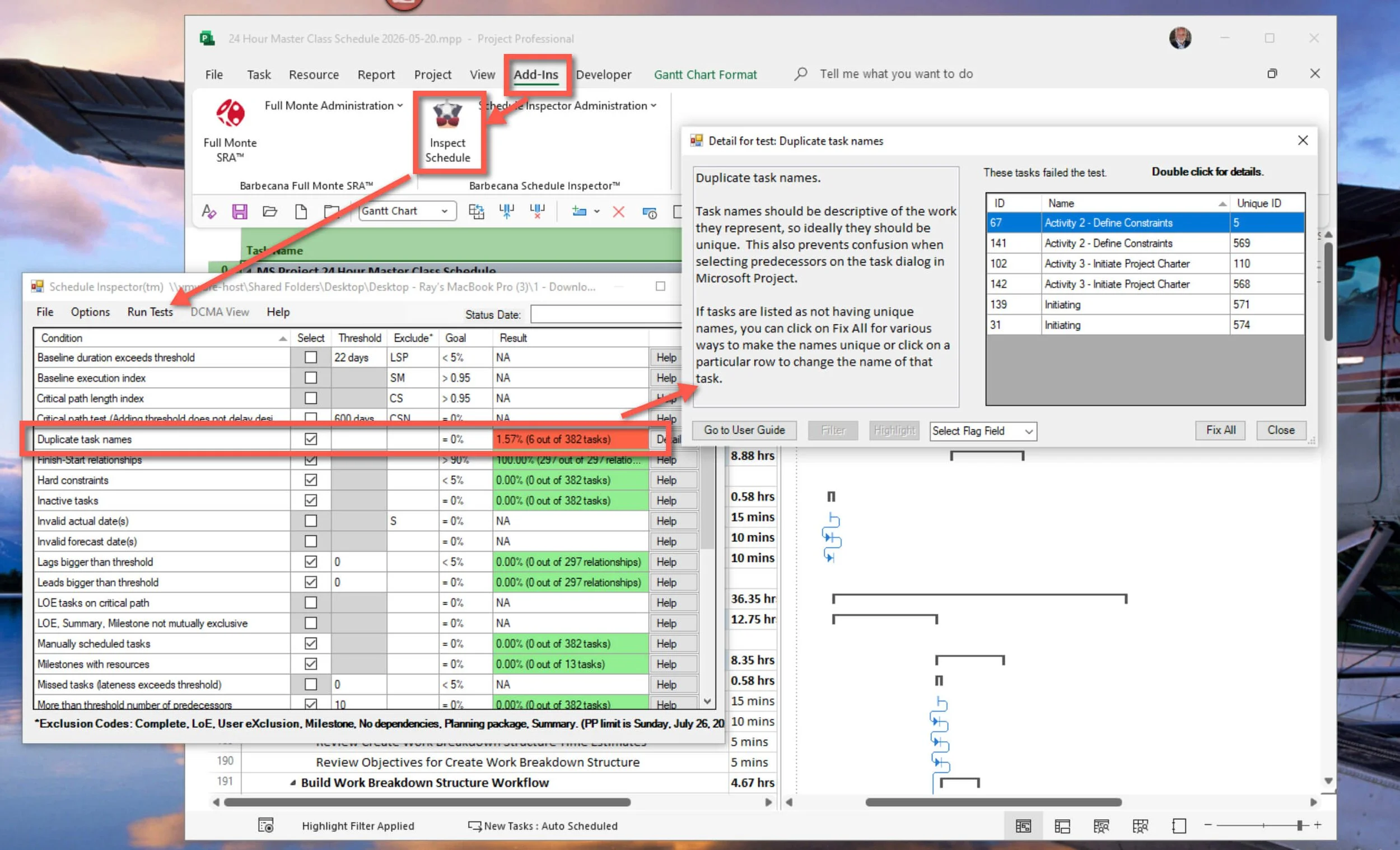
This illustration demonstrates how schedule quality assessment tools, including the DCMA 14-Point Assessment, help evaluate the technical quality of Microsoft Project schedules. These reviews identify issues such as duplicate task names and other structural problems that can reduce schedule accuracy and reliability.
At the same time, professional project management often leads organizations to create their own standards. Some make templates, scheduling guidelines, reporting structures, or schedule reviews. Others change their practices slowly over time. Different industries, contracts, company cultures, and management styles all lead to different planning needs.
Over the years, one of the most useful lessons I have learned from clients is captured in a simple phrase:
“This is what works for us.”
That idea is important because Microsoft Project is powerful primarily because of its flexibility. It can fit a range of industries, project types, company structures, and reporting needs. But this same flexibility, while making it popular, can also make it harder to maintain consistency and control.
That is why I am not trying to set a strict, one-size-fits-all standard in this Master Class. Instead, I focus on principles that help create stronger plans across industries. The objective is to build project plans that are logical, connected, easy to maintain, forecastable, capable of withstanding professional review, and structured so Microsoft Project calculates them correctly.
Standards and review tools can help, but they do not develop skill on their own. A checklist cannot take the place of good judgment. An assessment tool cannot ensure the project manager really understands the work. Even a technically correct schedule does not guarantee good leadership or decision-making.
Beyond Templates, Checklists, and Software Commands
A professional project manager goes beyond just following a checklist. They know how projects work, understand the tasks being performed, and can use tools like Microsoft Project effectively to build and manage a realistic plan. They can tell when a plan matches reality and when it does not. They know how to read the schedule and react when things change.
That is the philosophy behind the Master Project.
Master Project FAQs
What Is a Master Project?
A Master Project is a full Microsoft Project plan that students create during the MS Project Master Class. Instead of working with separate exercises or simple examples, students gradually build a professional project plan as they learn new planning elements, workflows, controls, resources, estimates, and reporting structures.
A Master Project in Microsoft Project is set up using best practices, with the calculation engine properly configured.
Why Is the Master Project Important?
The Master Project helps students learn Microsoft Project by guiding them through building and managing a real project plan from start to finish. Rather than just memorizing software features, students see how project structure, estimates, schedule logic, resources, calendars, baselines, and controls all work together in a full planning and forecasting system.
What Does a Professionally Structured Master Project Include?
A well-structured Master Project usually includes a Work Breakdown Structure (WBS), summary tasks, activities, milestones, schedule logic, dependencies, estimates, resources, calendars, costs, baselines, progress updates, reporting structures, and project controls. These parts work together to create a schedule that shows how the project should run in real life.
How Does the Master Project Relate to Microsoft Project?
The Master Project is created and managed in Microsoft Project using its calculation engine. Microsoft Project calculates dates, work, costs, resource usage, float, and schedule behavior based on how the project plan is set up. The accuracy of these calculations depends on how well the project is structured.
What Makes a Master Project Different from a Typical Microsoft Project Schedule?
Many Microsoft Project plans are little more than task lists with dates. A Master Project, on the other hand, is a connected planning and forecasting model that supports estimating, scheduling, resource planning, reporting, forecasting, and project control throughout the project’s life cycle.
The Master Project is based on the idea that professional project managers bring together three key skills:
Project management and leadership knowledge and skill.
Industry or domain expertise.
Ability to build a technically correct plan in Microsoft Project.
By building the Master Project, students develop all three skills simultaneously.
Is the Master Project Based on Real Project Management Practices?
Yes. The Master Project uses many of the planning, scheduling, forecasting, and project control methods found in real project environments. The Master Class also covers schedule-quality ideas, such as the DCMA 14-Point Assessment and other industry methods for evaluating project plan structure.
Can the Master Project Be Used for Real Projects?
Yes. Many students use the Master Class's structure, workflows, templates, and planning techniques to create and improve real Microsoft Project plans at work. The Master Project is meant to demonstrate how professional plans are developed and managed in real-world situations.
Do Organizations Use Different Standards for Project Plans?
Yes. Organizations often create their own scheduling standards, templates, reporting needs, and review processes based on their industry, contracts, governance, and management style. The MS Project Master Class teaches principles and techniques for building stronger, more reliable project schedules across industries.
Does Building a Master Project Guarantee Project Success?
No. Having a well-structured plan matters, but tools and standards by themselves are not enough. Successful projects also need leadership, good judgment, communication, technical know-how, and the ability to adapt when things change. The Master Project is also designed to help students build broader project management skills.