

Last Updated: August 3, 2026
Project MAP (Model, Activities & Process)
The MS Project Master Class uses Project MAP (Model, Activities & Process), a structured Microsoft Project learning system based on the traditional project life cycle. Many organizations use this approach to plan, manage, and complete projects. Project MAP is both the foundation for the course and the method you will use to build a solid project plan in Microsoft Project.
Instead of learning Microsoft Project one feature at a time, you will follow a series of Activities that reflect how real projects are managed. As you go through the Master Class, you will apply each concept and technique directly to your own Master Project. Step by step, you will build a complete project plan that helps with estimating, scheduling, resource planning, cost management, forecasting, reporting, and project control.
New to the MS Project Master Class?
If you found this page through a search engine or external link, use the Start Here button below to learn about the Free and Complete MS Project Master Classes, the Learning Portal, Project MAP framework, Activity Workspaces, exercises, and the Master Project.
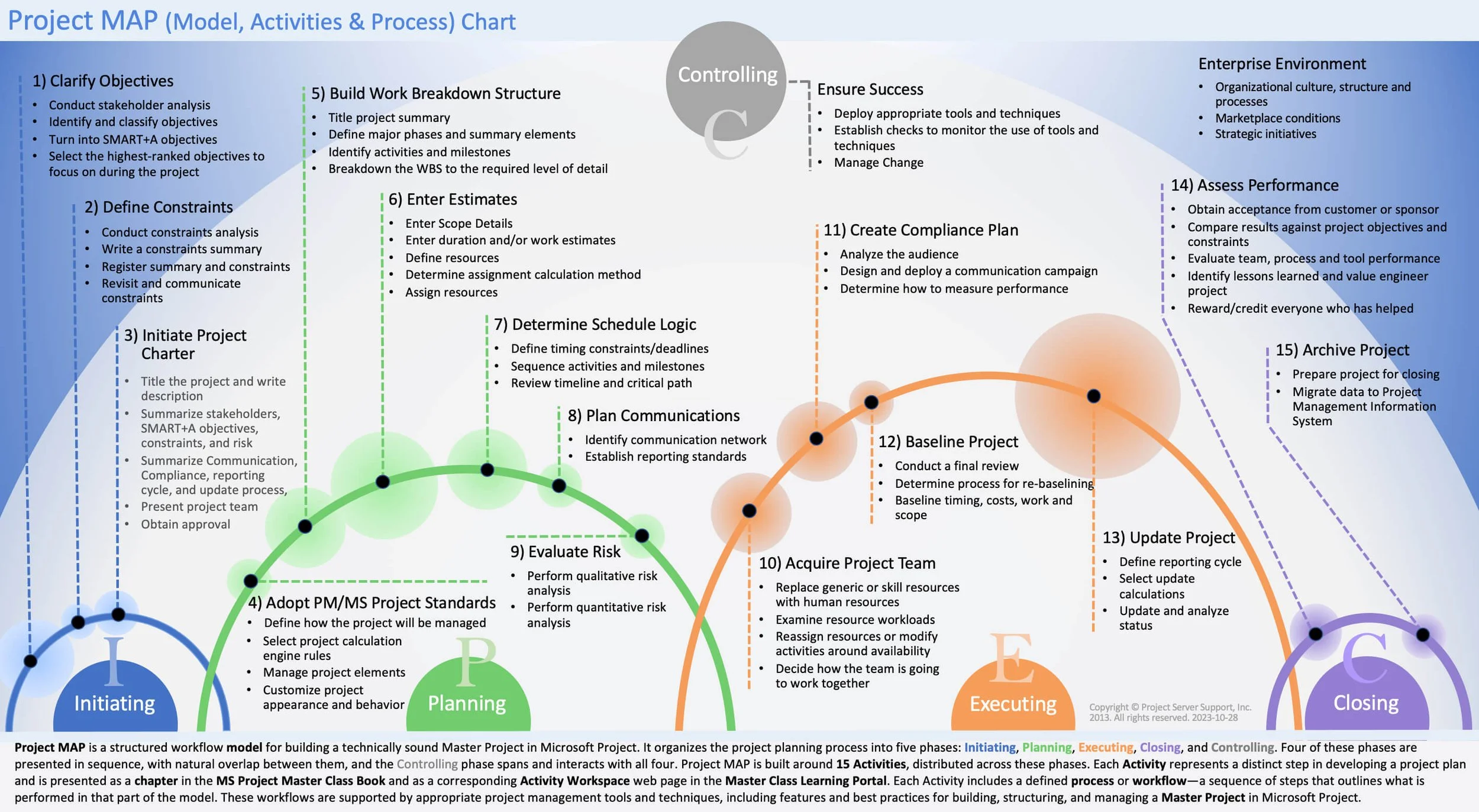
The Project MAP (Model, Activities & Process) framework provides the roadmap for the MS Project Master Class. It organizes fifteen Activities into the traditional project life cycle, helping students build a complete Microsoft Project schedule by following structured workflows, project management best practices, and the Project MAP methodology.
Activity Workspace < Project MAP > Mastery Journey
Project MAP breaks project work into five connected phases:
Initiating
The Initiating phase clarifies objectives, sets constraints, identifies stakeholders, and lays the groundwork for the project. Here, you figure out why the project exists, what it should achieve, and the environment it will operate in.
Planning
In the Planning phase, you turn project objectives into a detailed plan. You organize the scope into a work breakdown structure (WBS), create estimates, identify resources, build schedules, assess risks, and set budgets. Planning turns ideas into a practical project structure.
Executing
The Executing phase is when you carry out the planned work. You assign the team, complete activities, produce deliverables, and track progress against the project plan. Project managers regularly compare actual results to the plan to spot issues early and stay on track with project goals.
Closing
The Closing phase wraps up the project. Deliverables are accepted, documentation is finished, lessons learned are reviewed, contracts are closed, and the project ends in an organized way.
Controlling
The Controlling phase happens alongside all other phases. Here, control means keeping track, evaluating, forecasting, and making adjustments. Throughout the project, managers monitor progress, check for differences from the plan, manage risks, review scope, and analyze performance. They use tools such as the work breakdown structure, the Critical Path Method, baseline management, resource management, and change control to keep the project on track.
There are 15 Activities spread across these phases. Each one is a key step in building a well-structured Microsoft Project schedule. Every Activity Workspace corresponds to a chapter in the MS Project Master Class Book that includes related exercises.
As you go through the MS Project Master Class, you will keep applying new concepts from each Activity Chapter to build and improve your Master Project. You will add planning elements, estimates, schedule logic, team members, costs, reporting structures, and controls as your project develops.
Project MAP has three main purposes:
It follows the traditional project management life cycle used in real projects.
It is consistent with the inherent process built into Microsoft Project.
It provides a structured and step-by-step framework for learning and using Microsoft Project.
The phases are shown in order for teaching purposes, but real projects often repeat steps. Objectives can change, risks may become clearer, and plans might need to be adjusted as you learn more. Still, some planning steps depend on others. For example, it is best to clarify objectives before detailed planning and set schedule logic before saving a baseline. Teaching the material in this order helps you see how the parts of a project plan fit together.
Projects work within a larger organizational setting. Organizations have strategies, rules, processes, systems, budgets, stakeholders, and outside pressures that affect how projects are planned and managed. Projects are rarely separate from everything else; they are often the primary means by which organizations achieve their goals and make changes.
That is why careful planning and accurate scheduling are important. Microsoft Project helps project managers organize scope, structure work, assign resources, build schedules, manage costs, track performance, review forecasts, and keep control throughout the project.
In the MS Project Master Class, Project MAP serves as both a guide to project management and a framework for learning Microsoft Project. As you work through the Activities, you will keep coming back to Project MAP to see where you are in the planning process and how each Activity helps you build a complete and reliable project plan.
By the end of the Master Class, you will understand not just the features of Microsoft Project, but also how they work together in a structured project management process to support professional planning, scheduling, forecasting, and project control.
Project MAP FAQs
What Is Project MAP?
Project MAP (Methods, Activities & Process) is the framework we use in the MS Project Master Class to organize project planning, scheduling, control, and learning activities. It follows a clear sequence that mirrors the life cycle of a real project.
How Does Project MAP Relate to Microsoft Project?
Project MAP gives you a structured way to build and manage project plans in Microsoft Project. As you move through the Activities, you’ll use project management concepts, workflows, and scheduling techniques right in Microsoft Project to create a complete Master Project. Project MAP integrates traditional project management theory with the internal process built into Microsoft Project.
What Is the Model in Project MAP?
The Project MAP chart is the Model. It shows five overlapping project life-cycle Processes, 15 Activities, and the recommended Workflows used to build the Master Project throughout the MS Project Master Class.
What are Activities in Project MAP?
Activities are the main steps you’ll take to build your project in the MS Project Master Class. Each Activity covers a key part of creating a full project plan, like building a Work Breakdown Structure, entering estimates, setting up schedule logic, planning resources, or setting project controls.
What is the Process in Project MAP?
The Process in Project MAP is the main phases of a project’s life cycle: Initiating, Planning, Executing, Controlling, and Closing.
This Process helps you organize how projects are planned, managed, tracked, and finished.
What Is a Workflow in the MS Project Master Class?
A Workflow is the step-by-step process you follow to complete an Activity. Workflows guide you as you use project management concepts and Microsoft Project features in the Learning Portal and Activity Workspaces.
What Is the Master Project?
The Master Project is the full Microsoft Project plan you’ll build during the MS Project Master Class. As you work through the Activities, you’ll keep adding and improving structure, estimates, schedules, resources, costs, controls, reports, and forecasts. The Master Project adheres to industry standards and best practices.
Is Project MAP Based on Real Project Management Practices?
Yes. Project MAP uses many of the planning, scheduling, estimating, control, and forecasting methods that experienced project managers, schedulers, consultants, PMOs, and organizations use for real projects.
Who Should Use the Project MAP Framework?
Project MAP is for project managers, schedulers, students, trainers, consultants, PMOs, organizations, and schools that want a practical, structured way to learn Microsoft Project and build professional project plans.