

MS Project Master Class
Master Class Learning Portal
The MS Project Master Class Learning Portal is the central learning environment for both the Free and Complete MS Project Master Classes. It provides a structured path for learning Microsoft Project, building a Master Project, and developing the knowledge, skills, and judgment of the Professional Project Manager.
This Master Class Learning Portal provides students, coaches, trainers, organizations, and schools with access to the Project MAP framework, activity overviews, workspaces, exercises, exams, reference materials, and step-by-step guidance for building a Master Project in Microsoft Project. Unlike most software training workshops, classes, seminars, or courses that mainly teach commands and features, the Learning Portal focuses on helping you grow as a Professional Project Manager. It shows how project management principles, technical skills, planning tools, and Microsoft Project work together to ensure project success. If you are taking the Free MS Project Master Class, the Learning Portal is your main learning space. If you are enrolled in the Complete MS Project Master Class, your main resource is the MS Project Master Class Book, while the Learning Portal offers extra workspaces, downloadable resources, exams, coaching details, and more guidance. Together, the book and Learning Portal provide a clear, organized system to help you build a clear, logical, and technically sound project plan and strengthen your project management knowledge and skills.
Project MAP provides the structure
The Master Project provides the proof
The Mastery Journey provides the path
The Professional Project Manager is the goal
The Master Project is the product of this Master Class. The Professional Project Manager is the goal.
Welcome to the MS Project Master Class.
Since Microsoft Project was first released in 1990, I have worked with thousands of project managers across many industries worldwide. Over the years, I have learned that successful projects need more than just knowing how to use the software. They also depend on good project management practices, technical skills, effective planning tools, and the ability to bring everything together with sound judgment.
The MS Project Master Class comes from years of hands-on experience, lessons learned, consulting, and teaching. It is more than a typical Microsoft Project course. This program is a complete learning system that helps students build a Master Project and grow the knowledge, skills, and judgment needed to become a strong Professional Project Manager.
With the Project MAP (Model, Activities & Phases) framework, students learn how all parts of a project—such as objectives, constraints, scope, estimates, schedules, resources, risks, baselines, controls, performance checks, and archives—work together to ensure project success. Throughout the Master Class, students build and refine a Master Project that demonstrates what they have learned and how they can apply Microsoft Project in real-world project management.
No matter your experience with Microsoft Project, this Master Class offers a clear path for professional growth. You can choose between the Free and Complete MS Project Master Class, earn Certificates of Completion, work with Certified Coaches and Trainers, and progress through a self-paced Mastery Journey that aligns with your goals and experience.

This Master Class is based on over thirty-six years of hands-on experience using Microsoft Project in a wide range of organizations, including government, industry, healthcare, defense, manufacturing, higher education, and international consulting. The techniques you will learn are taken from real projects, not just classroom theory or software manuals.
During the course, Field Notes and Case Examples, I will share stories and lessons from real Microsoft Project implementations, showing both what works well and the common challenges people face. These examples show that good project management is about more than just knowing how to use the software. It takes judgment to understand what works, what doesn’t, what project teams often struggle with, and what makes the difference between a project plan that looks right and one that actually works.
This Master Class is not just about teaching you how to use Microsoft Project. The goal is to help you think like an experienced project manager by combining solid project management principles with practical ways to use Microsoft Project to build, review, and manage strong project plans.
How to Take the MS Project Master Class
The MS Project Master Class is available in two versions: the Free MS Project Master Class and the Complete MS Project Master Class. Both use the Project MAP (Model, Activities & Phases) framework to guide students through developing a Master Project while learning Microsoft Project and project management best practices.
The comparison chart below summarizes the major differences between the two options.
Free MS Project Master Class
The Free MS Project Master Class provides access to the Learning Portal, Project MAP framework, Activity Overviews, and Activity Workspaces. Students can explore the framework, learn Microsoft Project concepts, and begin building a Master Project through a completely self-directed learning experience.
This option is ideal for students who want to explore the MS Project Master Class, understand the Project MAP framework, and begin developing Microsoft Project skills at no cost.
Complete MS Project Master Class
The Complete MS Project Master Class combines the MS Project Master Class Book published on Amazon with the Learning Portal to create a comprehensive learning system. In addition to everything included in the Free Master Class, students gain access to downloadable project files, follow-along examples, exercises, exams, pretests and posttests, Master Project review opportunities, and Certificate of Completion options.
This option is ideal for students who want the full learning experience and wish to develop advanced Microsoft Project and project management skills through a structured program of study, practice, assessment, and professional development.
The Free Master Class helps you explore the system. The Complete Master Class provides the complete learning experience.
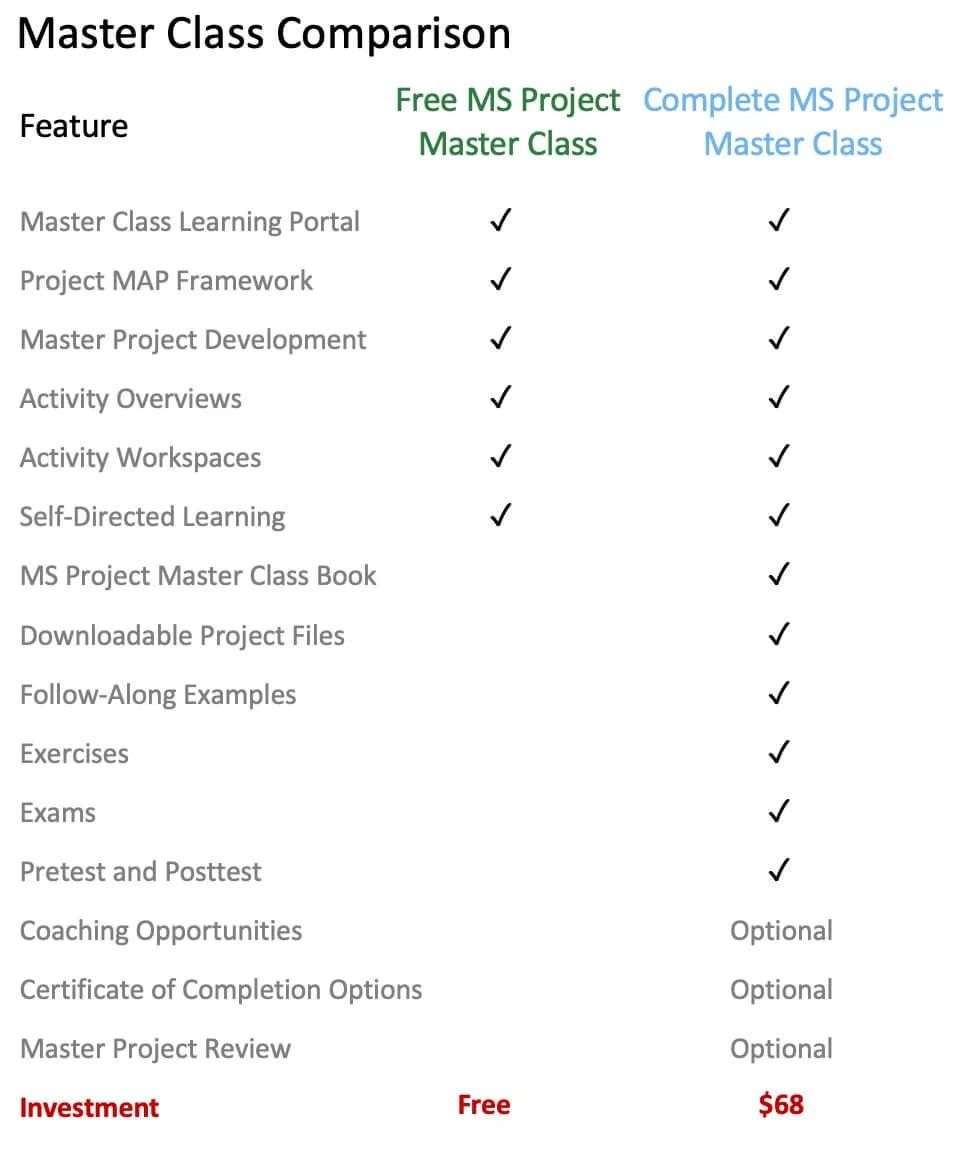
Comparison table illustrating the differences between the Free and Complete MS Project Master Class learning options.
To find out how to get started with either of these two Master Classes, click on the Start Here button.
Read more about these two Master Classes.
Read more about the MS Project Master Class Book by clicking on the button below.
Earn a Certificate
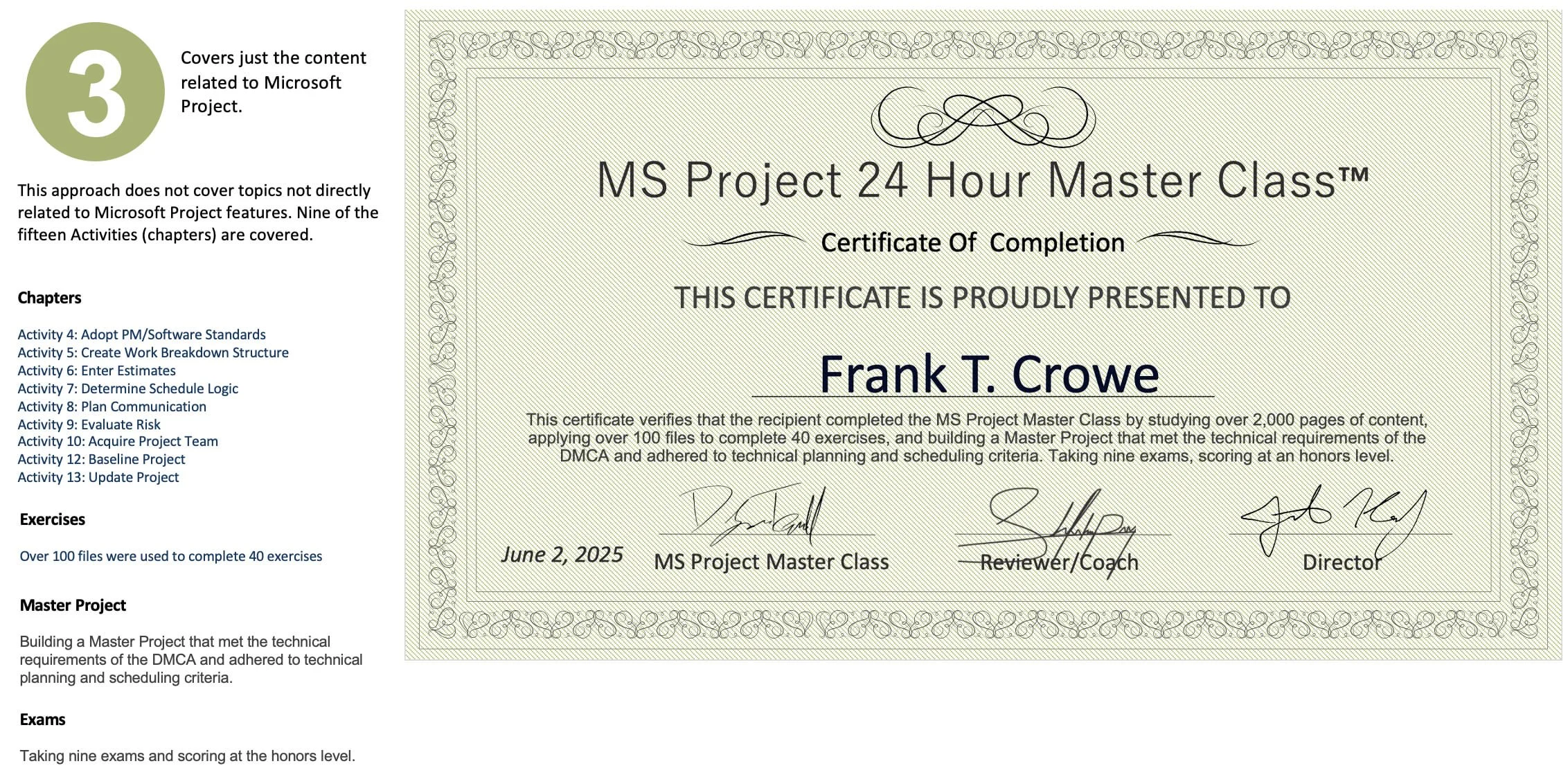
After choosing your Mastery Journey, you can decide if you want to earn a certificate.
This certificate program is more than just a test or self-reported experience. Experts and experienced professionals will review and assess the Master Project you complete in the class.
Mastery Journey
You can take the Complete MS Project Master Class in a few different ways. For example, it might build on a recent training workshop or a college class you are taking.
Many people buy the MS Project Master Class Book on Amazon and work through each chapter at their own pace.
Since this is a Mastery class, every path you choose will take time, effort, and commitment.
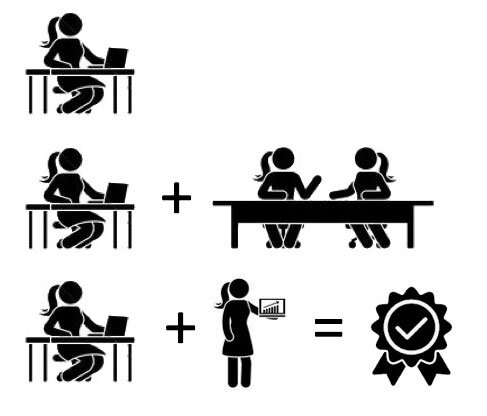
Once you have the MS Project Master Class Book, you can choose from three different learning paths.
Journey 1: Completely Self-Directed Master Class
Work through the Master Class Book on your own and complete all fifteen activities or the chapters related to Microsoft Project. You only need to buy the book on Amazon, making this a great value.
Journey 2: Self-Directed Master Class with a Coach
Many people find that having a coach helps them succeed. We have coaches ready to guide you through the Master Class. Just contact us, and we will connect you with a Master Coach.
After you choose your Journey, you can pick from three ways to cover the course material. One option covers everything, while the others cover less. This is a Master's Course, so expect to put in real effort.
If you work with a coach, you will meet with them either online or in person. Your coach could be someone we have certified or anyone using these materials to help you learn Microsoft Project. You can work one-on-one or in a small group, which can help lower costs.
In both Journeys, you will work on a Master Project that can be related to your job or a personal interest. By finishing all the readings, exercises, reviews, and exams, you will complete the Master Class and grow as a project manager.
Additional Journeys
There are other ways to take this Complete MS Project Master Class that may have been configured by your PMO, manager, or a coach or trainer. Perhaps the Master Class was initiated with in-person training, or your Master Class experience is being tightly integrated with your organization’s standards and processes.
Read more about the Mastery Journey by clicking on the button below.
MS Project Master Class Highlights
Project MAP (Model, Activities & Phases)
Project MAP (Model, Activities & Phases) is the main framework we use in the MS Project Master Class. It breaks project management into clear steps, grouped into the Initiating, Planning, Executing, and Closing Phases.
Instead of just focusing on Microsoft Project commands, Project MAP helps students see how professional project managers move from setting goals and dealing with constraints to planning, carrying out the work, tracking progress, assessing performance, and closing out the project. This framework guides you as you build your Master Project and forms the foundation for the whole class.
Project MAP provides the structure. The Master Project provides the proof.
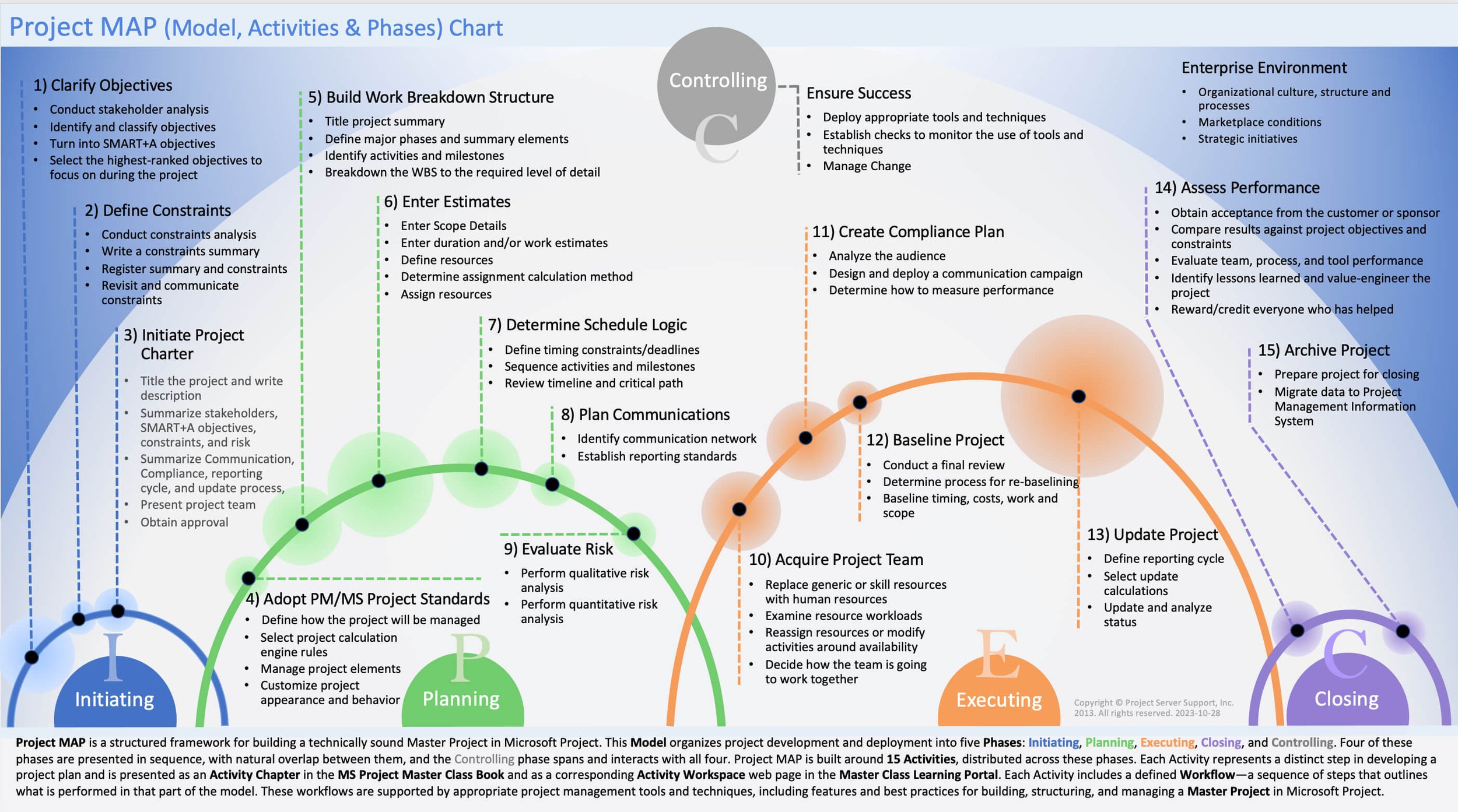
Each chapter in the Master Class Book is a Project MAP Activity. Each Activity Chapter has a corresponding Activity Workspace in this Master Class Learning Portal for applying what you learn and building a Master Project.
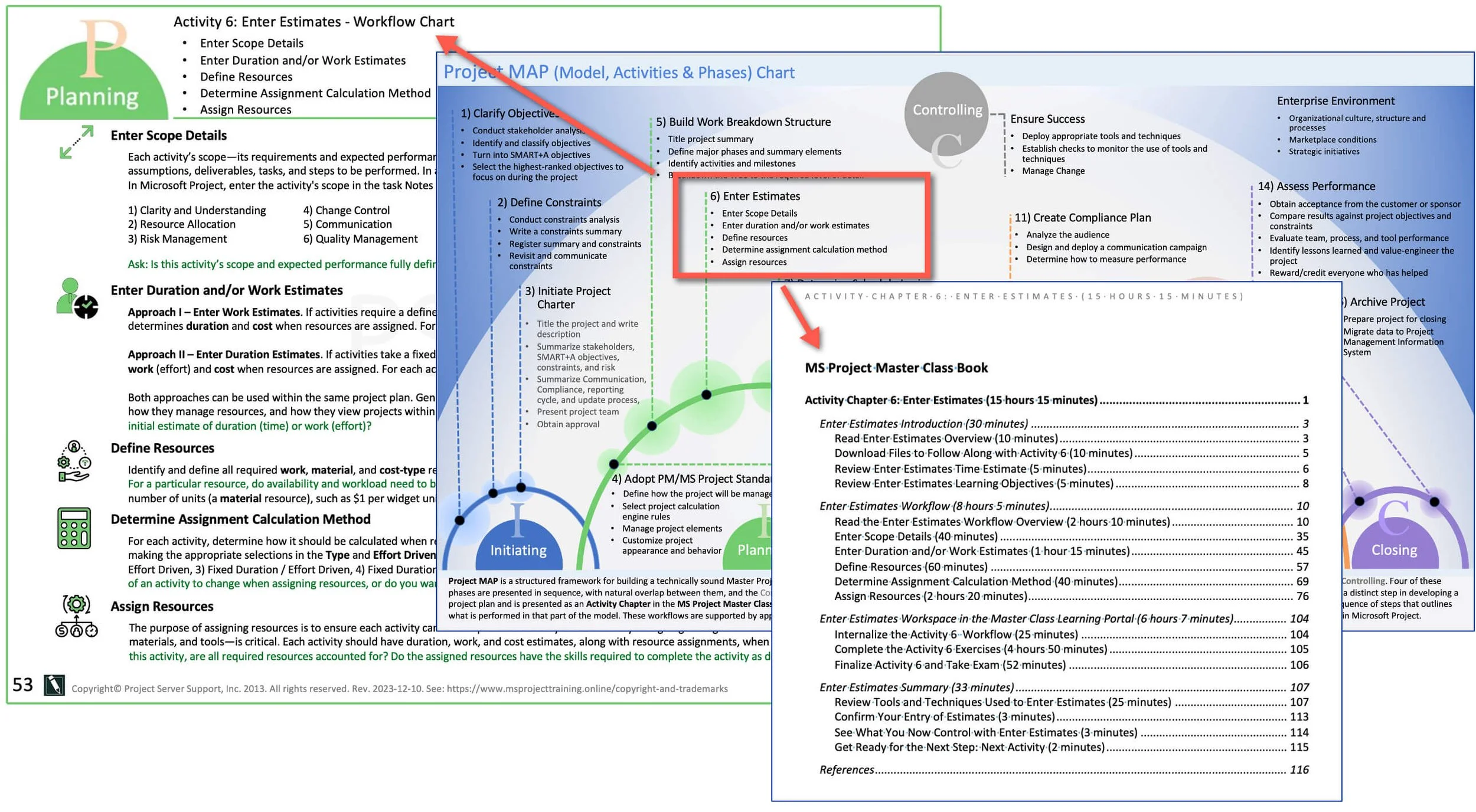
The Calculation Engine
In the MS Project Master Class, we look at Microsoft Project as a Calculation Engine rather than just a scheduling tool. The software is always running in the background, updating the relationships among scope, duration, work, resources, costs, calendars, constraints, and schedule logic. Knowing how this Calculation Engine works is key to creating a clear and reliable project plan. Students see that good project planning is about more than just entering data correctly. It also means understanding how Microsoft Project uses that data to make forecasts, spot differences, and help manage the project.
The Master Project
The Master Project is the main assignment you will work on during the MS Project Master Class. As you move through the Project MAP framework, you will build, update, and manage a full project plan in Microsoft Project. This project brings together objectives, constraints, scope, estimates, schedule logic, resources, risks, baselines, project controls, and performance data into one project management model. The Master Project is more than just an exercise. It shows what you have learned and how well you can use project management concepts in Microsoft Project.
Learn more about the Master Project by clicking on the button below.
The Professional Project Manager Model
A key idea in the MS Project Master Class is that running successful projects takes more than just knowing the software or understanding project management. The Professional Project Manager model focuses on three main areas: project management and leadership skills; technical, domain, or industry expertise; and proficiency with planning tools. Professional project managers combine all three. They know how to manage projects, have the technical background to make good decisions, and can use planning tools like Microsoft Project well. The MS Project Master Class helps students build these skills and grow as Professional Project Managers.
Comprehensive Microsoft Project Training Materials
The MS Project Master Class offers much more than a typical Microsoft Project course. You get a detailed textbook, an online learning portal, downloadable resources, exercises, assessments, coaching options, and a full project management framework—all in one system to help you become a skilled project manager.
Learn
You’ll have access to over 2,500 pages of content in the MS Project Master Class Book and Learning Portal.
The content is organized with the Project MAP framework and follows the standard project life cycle.
You’ll find hundreds of helpful figures, diagrams, and real-world examples.
You can learn at your own pace with a fully self-directed approach.
Practice
There are over 75 online exercises to help you practice.
You can use follow-along Microsoft Project files and examples.
Project management worksheets and planning documents are included to support your learning.
You’ll work with realistic project management scenarios and applications.
Build
Throughout the Master Class, you’ll build a complete Master Project.
You’ll apply project management concepts directly in Microsoft Project.
You’ll learn to create project plans that follow recognized planning and scheduling practices.
You’ll discover how to build clear, logical, and technically sound project plans.
Assess
There are seventeen exams to help you check your understanding and track your progress.
Pretests and posttests are included so you can see how much you’ve learned.
You’ll complete assessments for each Activity Chapter and Activity Workspace.
You’ll have chances to review learning objectives throughout the Master Class.
Access a Complete Resource Library
You’ll also get access to a wide range of supporting resources, including:
Over 125 downloadable charts and posters are included.
You’ll have access to Microsoft Project files and templates.
Project management worksheets and documents are provided to help you plan and organize.
You’ll find over 100 custom tables, views, groups, filters, and reports for Microsoft Project.
Reference materials designed to support project planning, scheduling, forecasting, and project control.
The result is more than a Microsoft Project course, workshop or class. It is a complete learning system designed to help students build a Master Project while developing the knowledge, skills, and judgment of the Professional Project Manager.
Most Microsoft Project training focuses on software commands and features. The MS Project Master Class teaches how Microsoft Project supports a complete project management process through the development and management of a Master Project.
Opportunities for Professional Coaches, Trainers, PMOs, Community Colleges, and Training Organizations
The MS Project Master Class gives coaches, trainers, PMOs, community colleges, workforce programs, and corporate training teams a ready-made way to teach Microsoft Project and project management. There’s no need to create your own curriculum, exercises, assessments, or materials.

This program includes a Learning Portal, the Project MAP framework, Master Project methods, Activity Workspaces, exams, downloadable resources, charts, posters, project files, and other instructional materials. Together, these tools form a complete learning system for coaching, workshops, classes, corporate training, or self-study. Instead of just teaching software features, the Master Class shows students how project management principles, technical skills, planning tools, and Microsoft Project work together to drive project success.
Coaches can use the Master Class to guide students, review their work, answer questions, evaluate projects, and help with professional growth. Trainers can use the curriculum for workshops, seminars, and classes, either in person or online. Community colleges and other educational groups can use the Master Class as a full project management and Microsoft Project program, combining textbooks, online resources, hands-on exercises, and assessments.
If your organization wants to use the MS Project Master Class, there are two key rules. First, all participants must purchase the MS Project Master Class Book before using downloadable materials such as project files, charts, posters, worksheets, and other resources for coaching or training. Second, only a Certified Master Class Coach or Trainer can review student work and give out the MS Project Master Class Certificate of Completion.
For coaches, trainers, PMOs, community colleges, and training organizations, the MS Project Master Class provides a proven The MS Project Master Class offers coaches, trainers, PMOs, community colleges, and training organizations a proven framework, a wide range of teaching resources, and a structured system to build Microsoft Project skills and develop professional project managers.
To learn more, click on the Become a Coach or Trainer button below.
Contact us if you would like more details on using these materials in your Microsoft Project and project management curriculum.
FAQs
What Is the MS Project Master Class?
The MS Project Master Class is a complete Microsoft Project training program. It brings together the Master Class Book, Learning Portal, Project MAP framework, Activity Workspaces, exercises, exams, downloadable resources, coaching, and certificate programs.
Students learn Microsoft Project as part of a full project management process. They build a Master Project and develop the skills needed to become a Professional Project Manager.
What Is the Difference Between the Free and Complete MS Project Master Class?
Both classes use the Project MAP framework and help students create a Master Project.
The Free MS Project Master Class uses the Learning Portal as the main learning space. It gives access to Activity overviews, Workspaces, and guidance.
The Complete MS Project Master Class uses the MS Project Master Class Book as the main resource. It also includes downloadable files, exercises, exams, coaching, and certificate options.
What Is Project MAP?
Project MAP (Model, Activities & Phases) is the main framework used in the MS Project Master Class.
It organizes project management into a clear sequence of Activities within the Initiating, Planning, Executing, and Closing Phases. This structure helps students develop and manage the Master Project.
What Is the Master Project?
The Master Project is the main project plan students build during the MS Project Master Class.
As students move through the Project MAP framework, they build, improve, manage, and review the Master Project. The finished Master Project shows what they have learned and how they can use Microsoft Project in real project management.
How Is This Different from Typical Microsoft Project Training?
Most Microsoft Project courses mainly teach software commands and features.
The MS Project Master Class teaches how project objectives, constraints, scope, estimates, schedule logic, resources, risks, baselines, project controls, performance checks, and project archives all work together for project success.
The goal is not just to learn the software. It is to help you grow as a Professional Project Manager.
What Is a Professional Project Manager?
A Professional Project Manager brings together three key skills:
Project management and leadership skills.
Technical or domain expertise.
Planning tool proficiency.
The MS Project Master Class helps you build all three skills by guiding you through the creation and management of a Master Project.
Can I Earn a Certificate of Completion?
Yes.
Students in the Complete MS Project Master Class can choose from several Certificate of Completion options.
To earn a certificate, a Certified Coach or Trainer, or an independent reviewer, will review your work and Master Project.
Can I Complete the Master Class at My Own Pace?
Yes.
The MS Project Master Class is a self-paced learning system. You can move through the content at a speed that fits your goals, experience, and schedule.
Are Coaches and Trainers Available?
Yes.
You can work on your own or get help from Certified Coaches and Trainers. They can answer your questions, review your work, check your Master Project, and help with certification.
Can Community Colleges, Trainers, PMOs, and Organizations Use the MS Project Master Class?
Yes.
Trainers, coaches, Project Management Offices (PMOs), community colleges, workforce development programs, and training organizations can all use the MS Project Master Class.
If your organization wants to use the downloadable training materials, please review the coaching and certification requirements in the Learning Portal.
What People Are Saying
“More practical and useful than any other management class I’ve taken.”
— Commerce Bank, Lawrence, KS
“Highly relevant course…”
— IT Manager US Secret Service, Washington D.C.
“As a group we now have a common language/method for managing projects”