

Last Updated: June 6, 2026
MS Project Master Class Activity Workspace
The MS Project Master Class Learning Portal is the online learning environment that supports the Master Class Book and provides the practical tools students use as they progress through the Project MAP framework. While the Master Class Book explains the concepts, workflows, and project management practices for building a technically sound project plan, the Learning Portal provides the files, exercises, and assessments to help you apply those ideas directly in Microsoft Project.
The Master Class is organized around the Project MAP (Model, Activities & Process) structured workflow framework, which reflects the traditional life cycle for planning and managing projects. The Master Class Book contains fifteen Activities (chapters), each describing the workflow for an important stage in developing a complete project plan. As students read about each Activity in the book, they move to the corresponding Activity Workspace in the Learning Portal to continue their learning.
Within the portal, students will find several types of resources that support each Activity. The Downloads Page provides follow-along files, exercise files, charts, posters, and other supporting materials referenced in the book. These resources allow students to open Microsoft Project and follow the examples as they read, reinforcing the concepts introduced in the Master Class Book.
Each Activity also includes a dedicated Activity Workspace. The Activity Workspace serves as the central page for completing the exercises associated with that Activity. It contains additional explanations of Microsoft Project features, instructions for completing the exercises, and guidance for updating the student’s developing Master Project. The Master Project is a complete project plan that is gradually built as you progress through the Master Class Activities.
New to the MS Project Master Class?
If you found this page through a search engine or external link, use the Start Here button below to learn about the Free and Complete MS Project Master Classes, the Learning Portal, Project MAP framework, Activity Workspaces, exercises, and the Master Project.
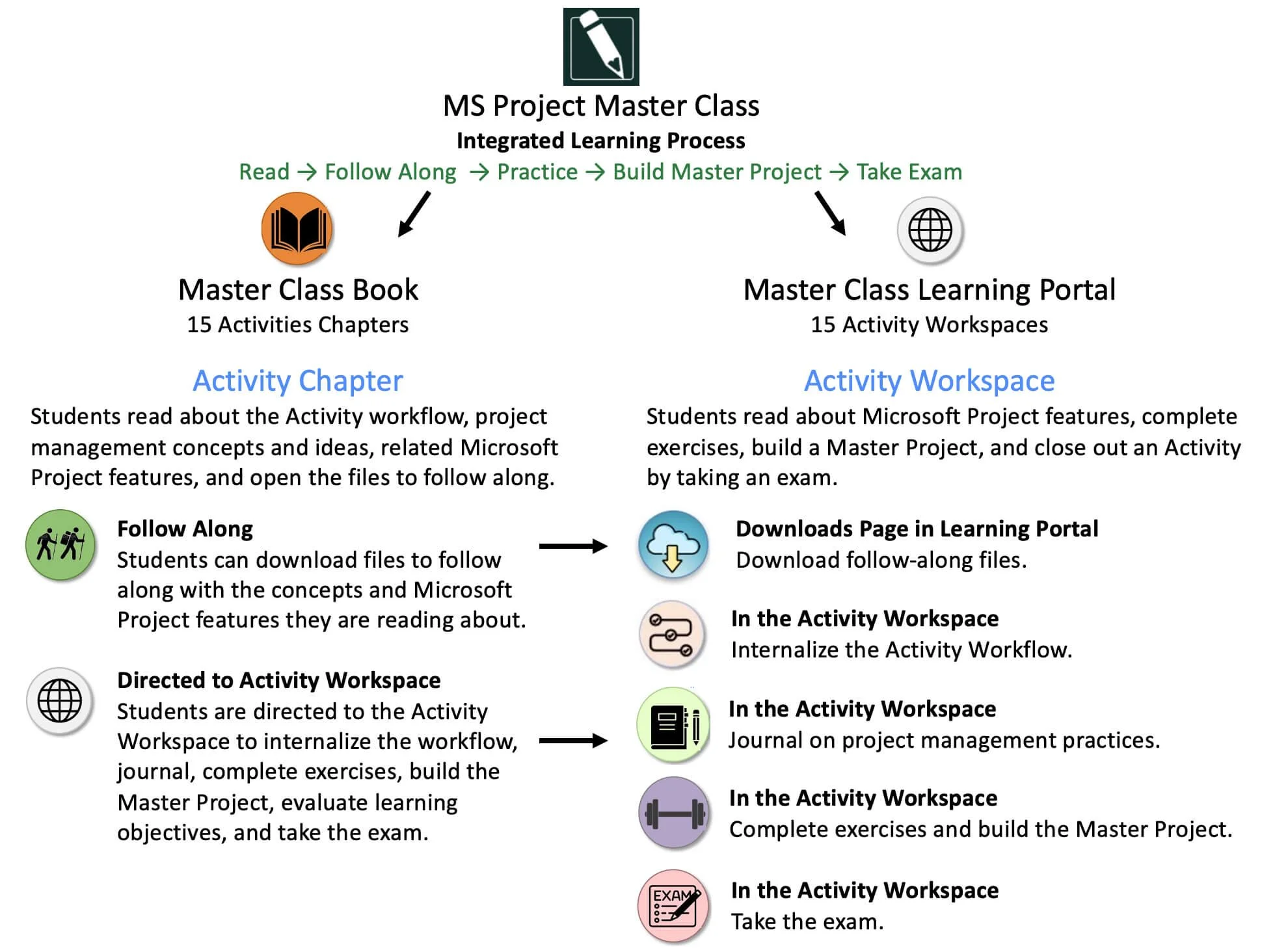
The MS Project Master Class Integrated Learning Process shows how the Master Class Book and Learning Portal work together. Students read each Activity Chapter, complete follow-along exercises, build their Master Project, and demonstrate their understanding through Activity exams.
Master Class Book < Activity Workspace > Project MAP
Each Activity Chapter in the Master Class Book has a corresponding Activity Workspace in this Learning Portal.
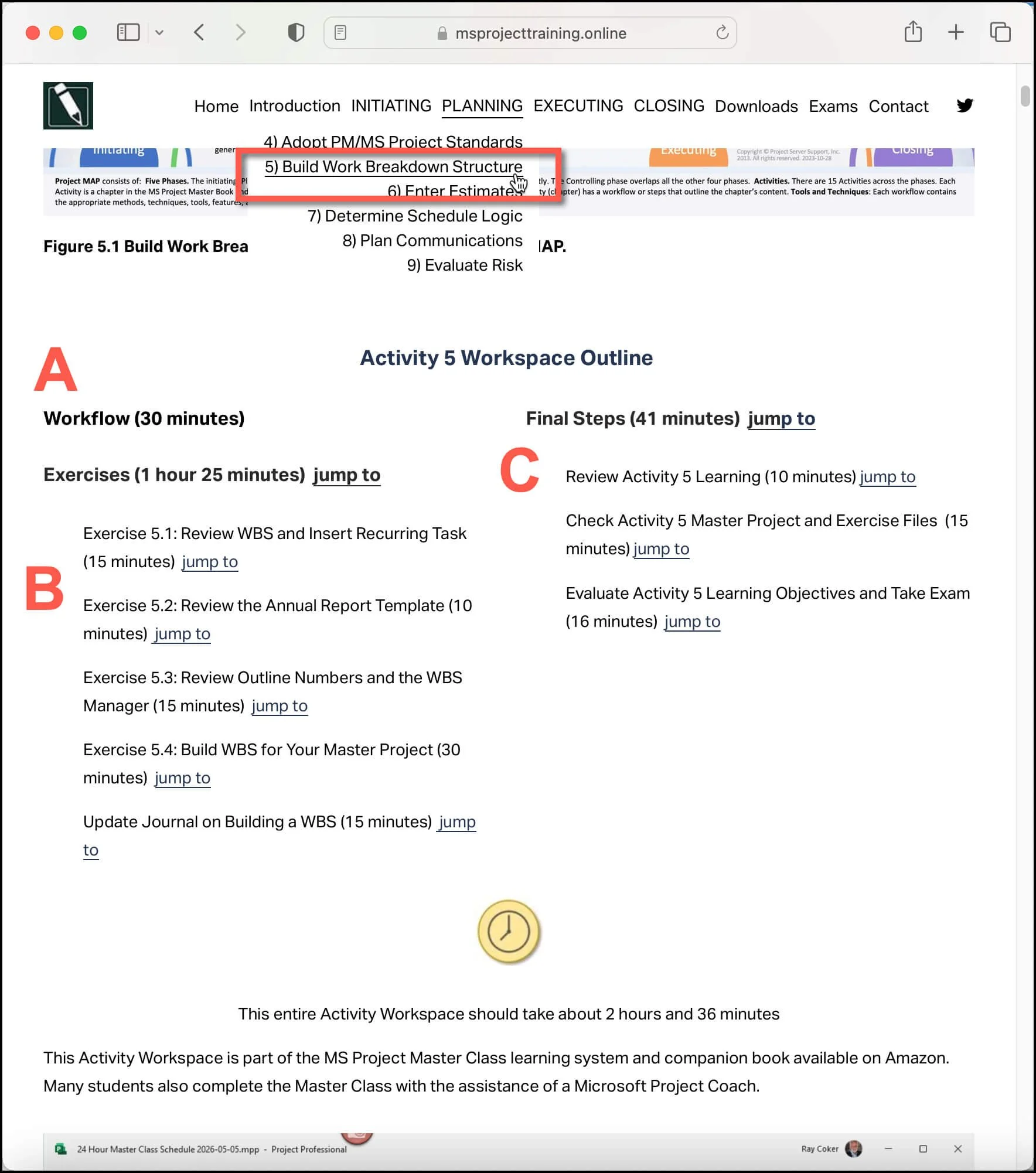
All Activity Workspaces are organized in the same way.
A - First, students internalize the Activity workflow.
B - Students then complete the exercises and build their Master Project.
C - Last, students finalize the Activity and take the exam.
Throughout the class, students move back and forth between the Master Class Book and the Learning Portal. The book explains project management concepts and workflows for building a Master Project, while the portal provides the tools to apply them in practice. This integrated learning approach allows students not only to understand how Microsoft Project works but also to develop the practical skills needed to build a structured, reliable project plan.
At the end of each Activity, students take an exam through the Learning Portal. These exams evaluate the student’s understanding of the concepts and techniques introduced in that Activity. The exams also help students confirm that they are ready to move forward to the next stage of the Project MAP framework.
By combining the Master Class Book with the MS Project Master Class Learning Portal, the program creates a structured learning system that blends explanation, practice, and assessment. As students work through the Activities, they gradually build their Master Project, reinforce their understanding through exercises, and verify their progress through exams. This process mirrors how real project plans are developed in professional environments—step by step, using disciplined workflows and practical application.
Activity Workspace FAQs
What Is an Activity Workspace?
An Activity Workspace is a dedicated part of the MS Project Learning Portal. It includes exercises, workflows, downloadable Microsoft Project files, charts, assessments, and other materials for each Activity Chapter in the MS Project Master Class.
How Do the Activity Workspaces Work with the Master Class Book?
Each Activity Workspace corresponds to an Activity Chapter in the MS Project Master Class Book. Students start by reviewing the concepts, workflows, standards, and examples in the book, then complete the related exercises and activities in the Learning Portal.
What Will I Learn in the Activity Workspaces?
The Activity Workspaces show students how to build and manage a full Microsoft Project schedule using the Project MAP framework and proven project management methods and best practices. As they progress, students develop a Master Project and learn skills such as estimating, scheduling, resource planning, cost management, forecasting, reporting, and project control.
Are the Activity Workspaces Free?
Yes. Anyone can access the Activity Workspaces for free through the MS Project Learning Portal. However, the exercise files and other downloadable charts are not available in the free MS Project Master Class. To download these files, or if you are taking the full MS Project Master Class, you will also need the MS Project Master Class Book.
What Is the Master Project?
The Master Project is the full Microsoft Project plan that students build during the MS Project Master Class. As students work through the Activities and Workspaces, they continue to add to and improve the Master Project, including new scope, estimates, schedule logic, resources, costs, controls, reporting, and forecasting details.
Why Does the MS Project Master Class Use Workflows?
Workflows help students see the step-by-step process for planning, scheduling, managing, and controlling projects in Microsoft Project. Instead of just learning separate software commands, students follow structured workflows that show how real projects are initiated, planned, and managed.
Are the Activity Workspaces Designed for Beginners or Experienced Users?
The Activity Workspaces are made for all experience levels. Beginners can follow the step-by-step workflows and exercises, while experienced project managers, schedulers, consultants, and trainers can use the material to improve their scheduling, project controls, and understanding of Microsoft Project as a professional tool.
Can Trainers, Consultants, or Colleges Use the Activity Workspaces?
Yes. The Activity Workspaces were designed to support classroom teaching, workshops, coaching, consulting, company training programs, and community college courses. The structured Activities, workflows, downloadable files, assessments, and Project MAP framework make it easy to teach and use in workshops. What sets it apart from Typical Microsoft Project Tutorials?
The MS Project Master Class offers a certification for Coaches and Trainers. Coaches and Trainers can use the Activity Workspaces, but without this certification, they can not use any of the downloadable files.
Most Microsoft Project tutorials, classes, workshops, or presentations mainly cover software features and commands. The Activity Workspaces go further by showing how these features work together in a structured project management process to help you build clear, logical, and reliable project plans.