

Last Updated: May 8, 2026
Activity 4: Adopt Project
This Activity Workspace is part of the MS Project Master Class……..
Figure 4.1 Adopt PM/MS Project Standards Activity in Project MAP.
Activity 4 Workspace Outline

This entire Activity Workspace should take 4 hours and 58 minutes to complete.
This Activity Workspace is part of the MS Project Master Class learning system and companion book available on Amazon. Many students also complete the Master Class with the assistance of a Microsoft Project Coach.
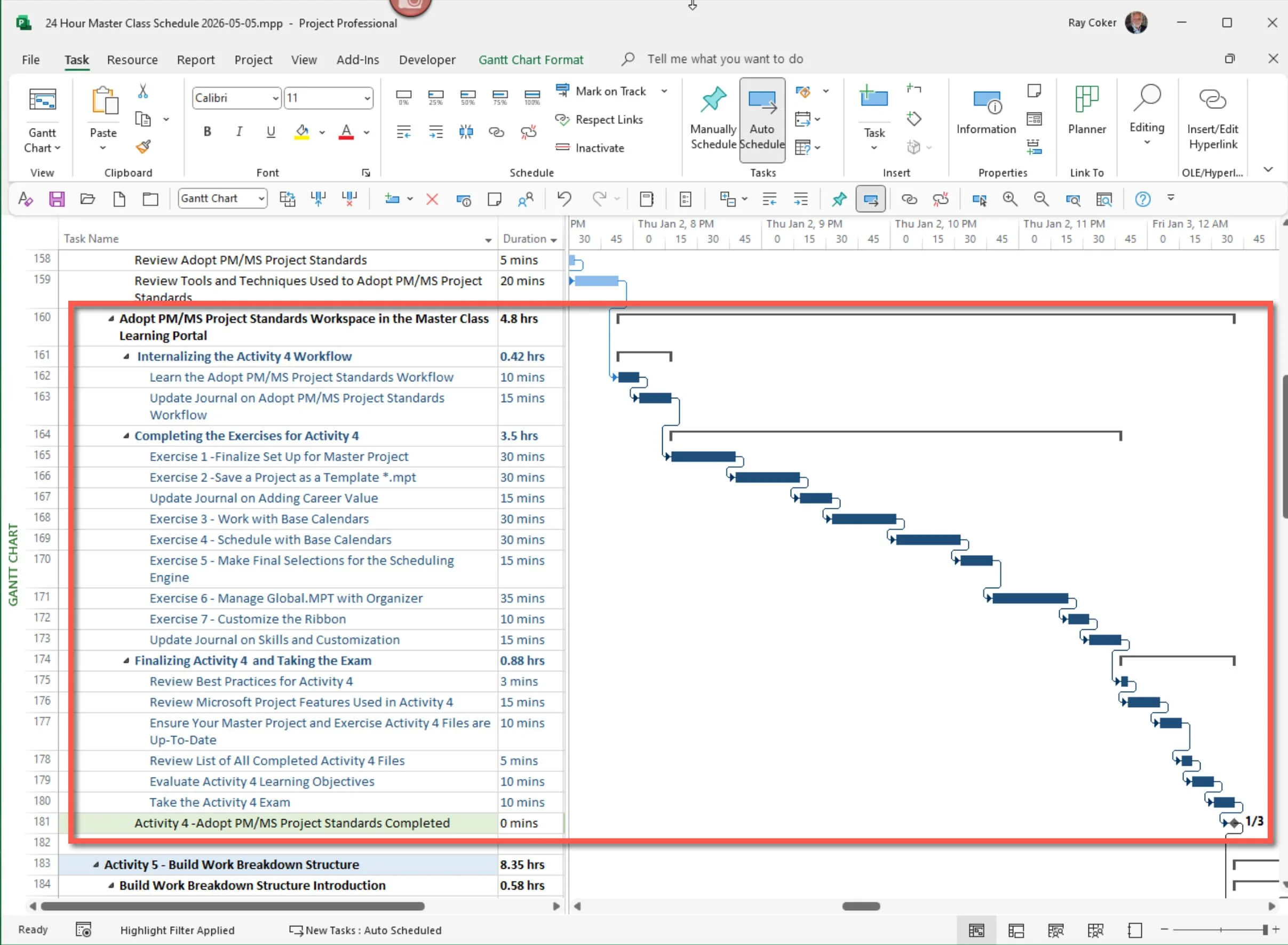
Figure 5.2 Workspace schedule.
Workflow
Adopt PM/MS Project Standards Workflow and What You Will Learn (25 minutes)
Before you start the exercises in this Activity Workspace, review the Activity 4 Workflow. It covers the key standards, settings, and Microsoft Project features that will shape how you build, calculate, view, and manage your project plan during the rest of the MS Project Master Class.
In this Activity, you will set up the planning environment needed for a solid Microsoft Project schedule. You will decide how to manage the project, choose Calculation Engine rules, organize key Microsoft Project elements, and adjust the software’s look and settings to fit your planning needs and your organization’s standards.
You will also examine how calendars, templates, views, tables, and other project features affect schedule calculations, reports, and project control. Since Microsoft Project uses your settings and information to figure out dates, durations, work, and costs, it’s important to set these standards correctly from the start. If calendars, constraints, or templates are not set up properly, or if standards are missing, your schedule and project data may become inaccurate later.
As you go through this Activity Workspace, you will do exercises to check project management standards, review Microsoft Project settings, manage project elements, and adjust your planning environment. These tasks will help you learn how Microsoft Project works and why experienced project managers, schedulers, PMOs, consultants, and organizations use standard methods to plan and manage projects.
This Activity also highlights a key idea of the MS Project Master Class: Microsoft Project is more than just a place to enter tasks. It is a professional planning and calculation system that requires careful setup and consistent use to provide you with useful and reliable schedule information.
Learn Adopt PM/MS Project Standards Workflow (10 minutes)
Define How the Project Will Be Managed: Establish the Captain’s Standards and Configure the Vessel


Best Practice
Project Managers

Activity 4: Adopt PM/MS Project Standards Workflow Chart
Before beginning the exercises in this Activity Workspace, take time to carefully review and internalize the Activity 4 Workflow Chart. This workflow represents more than a sequence of software steps. It reflects the logical process used to establish the PM/MS Project Standards that will govern how your Master Project is planned, calculated, organized, and managed.
As you work through this Activity, continually return to this workflow and use it to understand how the pieces fit together. The goal is not simply to complete exercises, but to develop a repeatable planning approach you can apply to future projects. Over time, this workflow should become second nature—helping you think more systematically about project setup, Calculation Engine configuration, Project Elements, and the overall project management environment before detailed planning begins.
The remaining Planning Activities depend on these standards being established correctly. Internalize the workflow now, and the rest of the Master Class will become far easier to understand and apply.
Figure 4.5 Adopt PM/MS Project Standards Workflow.

Download
Click the Download icon above and open the Adopt PM/MS Project Standards Workflow.pdf file.

Update Journal on Adopt PM/MS Project Workflow - 15 minutes
Journal Questions: Reflecting on the workflow for adopting PM/MS Project Standards described above:
Exercises
Exercises: Overview of the Adopt PM/MS Project Standards Exercises
Start a Master Project and Save a Project Template (1 hour 15 minutes)
This section’s exercises are split into two parts. The first two will help you create and set up your Master

Definitions
Blank Project: In Microsoft Project, a blank Project is a new, empty project file you create from scratch. Starting with a Blank Project allows you to build a plan tailored to your needs without predefined tasks or structure.

Exercise 4.1: Set Up for Your Master Project (30 minutes)
In this MS Project Master Class, you will create a Master Project in Microsoft Project. The objective is for you to
Figure 4.7 Start New Project Template.
When Finished with Exercise 4.1
You should have selected the project you will work on during this MS Project Master Class. This project will be your Master Project.
Exercise 4.2: Save a Project as a Template *.mpt (30 minutes)
In this next exercise, you will review and save a project as a Microsoft Project template file.
Update Journal on Adding Career Value - 15 minutes
Final Steps
Final Steps: Wrap Up Activity 4 (53 minutes)
In this final section, you will bring together the work completed while adopting PM/MS Project Standards.
Take some time to review the best practices for project management and using Microsoft Project. Think about the main ideas of project management and how you use them in Microsoft Project, especially with the Calculation Engine, Organizer, and working with views and tables.

Review Best Practices for Activity 4 (5 minutes)
Best practices in project management, including Microsoft Project, refer to a set of proven sistency. If fully developed, they can significantly cut the time and effort involved in planning.

Review Microsoft Project Features Used in Activity 4 (15 minutes)
Calculation Engine
By effectively managing vacation time and availability adjustments in Microsoft Project, you ensure that your

Ensure Your Master Project and Exercise Activity 4 Files are Up-To-Date (10 minutes)
Your Master Project has been used in some of the exercises. This Master Project will be updated throughout the MS Project Master Class.
When finished with Exercises 4.1 - 4.7, you should have the following:
Exercise 4.1: If this is the first Activity (chapter) in your MS Project Master Class Journey, you should have selected the project you will work on during this MS Project Master Class. This project will be your Master Project.


If you are working with a coach or plan to earn a certificate, use this file folder system to store your files.
Review List of All Completed Activity 4 Files (3 minutes)
The files used in this Activity Workspace include:
Your Master Project.mpp.
Template Exercise.mpt.
Calendar Rules.mpp.
Schedule.mpp.
Screenshot of Your Ribbon and Bridge Toolbar.
Your Updated Journal.
Adopt PM/MS Project Standards Learning Objectives.xlsx.
PDF of Your Exam Results.

What to Do with Your Files
After you finish this Activity, remember to save your files and keep them organized.
If you are working with a Master Class Coach:
Put all the files listed above into your folder structure as suggested.
Zip these folders before your next session.
Email the zipped file to your Master Class Coach.
You don’t need to send your files to a Certified Master Class Reviewer to earn a certificate; your coach will review your work.
If you are NOT working with a Master Class Coach (Certificate Path):
Put all the files listed above into your folder structure.
Zip the files to archive them and keep everything organized.
When you’re ready, send all your Activity files together to a Certified Master Class Reviewer for evaluation.
Important
As you work through all Activities, you’re building a complete set of project files. Keep everything organized since you’ll need the full set for review.
Evaluate Activity 4 Learning Objectives (10 minutes)
At this point, the goal is not just to recognize the steps in the workflow, but to understand how and why each step affects the final project schedule. Based on the learning objectives for the chapter on adopting PM/MS Project Standards in the project life cycle, here are some questions you could ask to determine if you have met the learning objectives:
Understanding the Importance of Standards:
Why is it essential to adopt project management and software standards in the planning and execution of a project?
How do PM/MS Project standards contribute to the success of project management?
These questions assess your understanding of the chapter's content, gauge your ability to apply the concepts to practical scenarios, and reflect on the implications of these standards and customizations in project management. If you can explain these ideas in your own words and apply them in Microsoft Project, you are beginning to think like a project manager using the tool correctly.

Before taking the exam, click the Download icon above and open the Learning Objectives for Adopt PM/MS Project Standards.xlsx and complete this evaluation of the learning objectives.

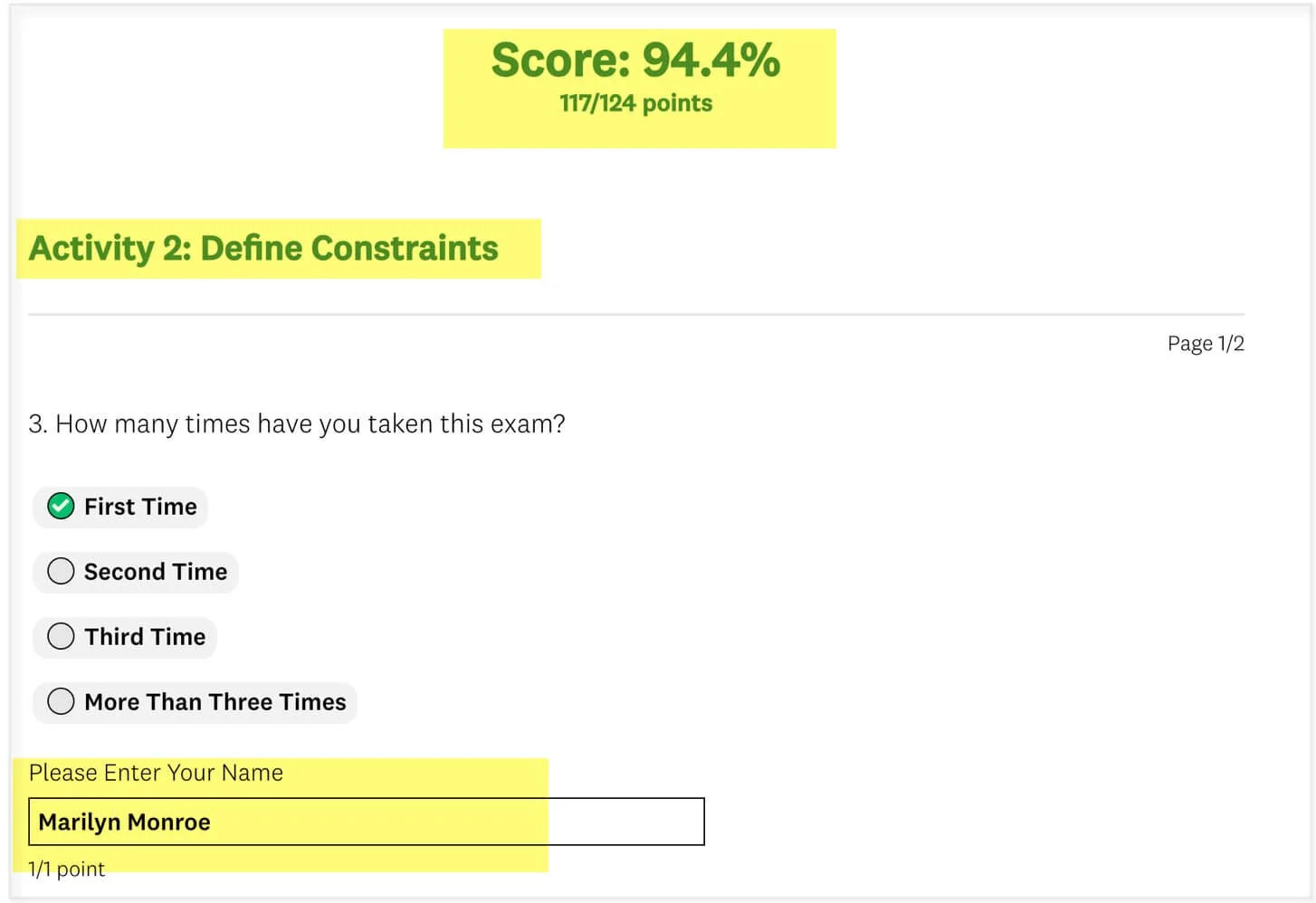
Final Score
When you are finished, print your score and exam results as a PDF file if you are working with a Coach or plan to earn a certificate.
Take the Activity 4 Exam (10 minutes)
Complete this Activity by taking the exam. Take the exam by clicking on the Exams button below.
Here are some essential guidelines for taking the exam:
Approach the exam as a closed-book assessment, relying solely on your memory and grasp of the subject matter.
Always select the most appropriate answer.
Keep in mind that answers carry different weights.
Feel free to attempt the exam multiple times to refine your understanding.
To attain the MS Project 24 Hour Master Class Certificate of Completion, achieve a final score of 80% or higher.
In this Master Class, the goal is not to learn just features—it is to learn how to build a project correctly so that Microsoft Project produces a reliable and defensible project plan.
With your PM/MS Project Standards now established, you have defined how Microsoft Project will calculate and manage your schedule.
The next step is to define what will be built, starting with Activity 5: Build Work Breakdown Structure.

Return to the Master Class Book, complete the Activity 4 Summary section, and then continue to Activity 5: Build Work Breakdown Structure.
Suggestions and Corrections
Please help us make this MS Project Master Class Book and the Master Class Learning Portal better. Click on the Comments button below to send us suggestions and corrections.